Today I’m heading to Berlin for the Leica ‚Das Wesentliche‘ Event. I expect to see the announcement of the M9 Monochrome and a new version of the X1, maybe with a Summilux 50mm attached. Let’s see if they have something else to tell us about. I’m also looking forward to meet a few people and shoot some photos in the streets of Berlin tomorrow evening.
I’ll post a summary of the event here on the blog and will also tweet live @_martinwolf.
Today I want to show you the next update of our QUOTE.fm Read Demo, but first I want to say thank you for your feedback last time. Some things really got us thinking.
As planned you can now change the font-family as well as the color themes. All three themes are finished and we like them very much, although minor changes could always happen. The fonts are by no means final. I also replaced all the generic avatars with real ones to get a feel for how it might look in actual use. Furthermore I updated the text view with an image which resizes according to the text’s width. We changed the icon for the social reading mode to match the one the app will feature. A new feature is the „Reset“ button which sets everything back to the defaults. There are a few more little tweaks and changes here and there. Just have a look.
The list of todos is still very long and new ideas pop up everyday. It really is very exciting build this ‚web app‘.
I know what you think, ‚please not another photo taking/editing app. The App Store is full of them and only a few are good enough to use them on a daily basis.‘ That’s exactly what I thought when I first heard of VSCO CAM. But this morning I downloaded the app to try it out myself because I heard sme good things.
First impression
I am really excited about this app. The design is not perfect, but it is very minimalistic, so it’s all about your photos. I like that. There are some other things I don’t like, for example the camera icon in the shutter button doesn’t turn when you hold your iPhone in landscape mode and if you locked your phone to portrait, you aren’t even able to take a landscape shot. This is a mistake a lot of photo apps do and I know it can be fixed because some apps behave differently. I always keep the global lock on, but take most of my photos, which are not going to Instagram, in landscape. So this ‚bug‘ annoys me a bit.
Using the app is very intuitive on first sight. But when you dive deeper and try to understand if you can revert some specific editing steps or what happens if you apply a settings twice and so on it’s not always immediately clear what happens.
Taking a photo
The photo taking is very simple and like the build in camera app. Nothing exciting here, but it is enough for me. Although sometimes it would be nice to place exposure metering and focus separately.
Editing a photo
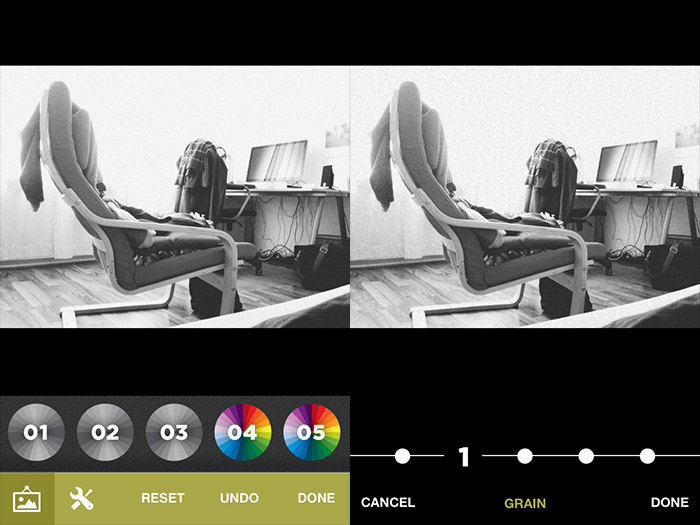
You have three choices while editing your photos. You can either simply apply a filter, there are three black and white ones and seven color filters, or edit the photo yourself or combine both methods, which is the way I go.
The are nine editing controls, from which you first only see five. You have to scroll horizontally to get to the other four. I simply didn’t recognise this at first. Same for the filters, but there I swiped intuitively. I don’t know why. The editing is very simple, you choose how much you want use a certain effect, tap ‚done‘ and choose another setting. You can apply every setting as often as you want. The effect stacks up. As far as I can see there is no way to reset a specific setting. Just the possibility to reset your whole editing process or do a global undo.
I am especially pleased with the black and white editing. And that’s something not one photo editing app I tried was really really good at. So here we go. And I love the ability to add grain. Overall the editing settings support the image style I like.
Sharing a photo
There are all kinds of sharing possibilitys as well as saving different sizes to your camera roll. You can even share to Instagram, which is pretty much useless, because it just opens the Instagram app with your chosen photo locked in the editing screen, letter boxed.
I really like VSCO CAM. This first version is very good, but I also hope they will ship some updates in the future to make the app even better. Go try it out yourself.
As it stands, the iPad is amazing. I use it every single day for writing, browsing the news, sketching ideas, and reading though email or tech riders and I love every minute of it. It f complements my daily life and on days when I don’t need to get any real work done, I leave my laptop at home. But when it comes to honest creative work I can not help but find the iPad as little more than a sidekick. I can say with certainty though, that this is far from the last word on this. I can clearly see a future where touch screen devices such as the iPad become more and more viable for the kind of things I have discussed here today. It is still new territory being explored and I for one can not wait to see where it takes us.
Shawn Blanc and some other writers on the web praised the iPad as their „new laptop“ and stated that it is capable of functioning as their main device for getting work done on the road. John Carey speaks up and I think he is absolutely right. The iPad is great for many things and maybe even a great working device for a writer, but for a lot of creatives like designers or developers it really is not able to replace a laptop, not even on the road. For me the perfect device for working while travelling would be a MacBook Air which, I think, will be my next main Computer. Still, I love the new iPad for all it is good at. But not for coding.
Ultimately we boil down to yet another well-worn cliche..it’s really about the pictures. Whether you shot with a 12mm and Kodacolor Gold 100 or the latest dslr capable of grinding coffee and launching a cruise missile, I’m going to simply look at what you created with your tool of choice. If what you created sucks, I’m going to offer suggestive help, and if what you created is grand I’m going to offer praise.
Daniel Milnor on the digital VS analog war. It’s ridiculous, but neither side stops this argument.
We want to make the most of the confined space and let key content and components flourish, but sometimes our hierarchy of elements can prevent that from happening. Say for example we want to present an article in the narrow single column view, but before the article appears in the stacking order we have: a header (containing site name etc), navigation, maybe even a banner advertisement, then the article. The heart of the page is buried beneath items that may be less important in this context. Rather than brutally hiding these items with a display:none property we can reorder them using another CSS property – flexbox.
Everybody who has some experience with building responsive layouts will love flexbox. Head over to Jordan’s article and learn how it works. Then view his demo. I love it.
The most powerful feeling that I have about my small home will always be the love I feel while nestled inside it. It’s cozy and comfortable, a great space to do my creative art, while also serving as my perfect retreat. I love everything about it!