Published earlier today and already discovered by AppleInsider, a new patent from Apple seems to show that the Cupertino company would like to put swappable lenses in future iPhones.
Doesn’t seem like something Apple would do, but we never know. I wouldn’t like that because I’m very happy with the one lens the iPhone provides. I can just shoot and don’t have to think about which lens to attach. Simplicity.
Besides that, a patent doesn’t even mean that they want to do this.
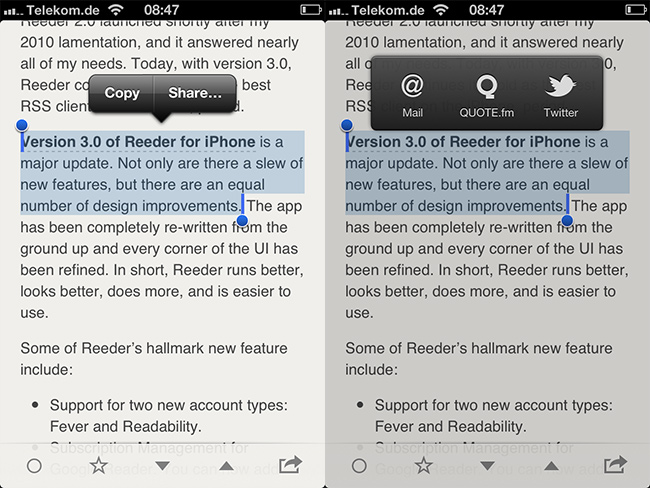
Today Reeder for iPhone 3.0 was released. I’m very happy to tell you that QUOTE.fm is one of the newly integrated sharing services. You can now easily select text while reading a great story in Reeder, tap „Share…“ and select QUOTE.fm.
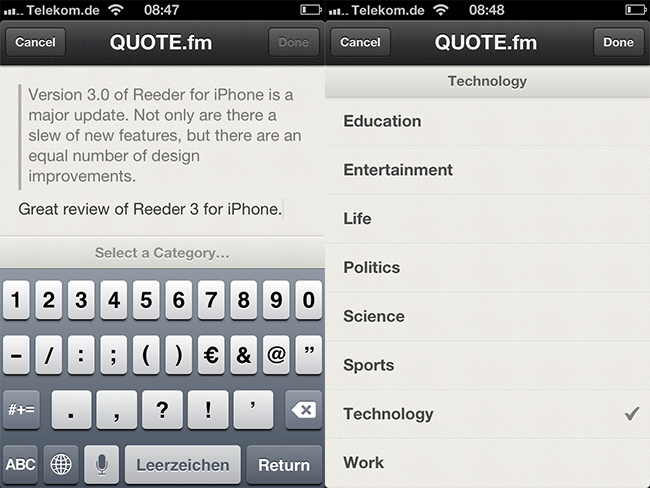
In the next step you can type a comment and select a category. Exactly like on the website, in the bookmarklet or the Chrome Extension.
Besides the QUOTE.fm integration Reeder 3.0 is an amazing update to an anyway great app. I use it every day. You should too.
I know what you think, ‚please not another photo taking/editing app. The App Store is full of them and only a few are good enough to use them on a daily basis.‘ That’s exactly what I thought when I first heard of VSCO CAM. But this morning I downloaded the app to try it out myself because I heard sme good things.
First impression
I am really excited about this app. The design is not perfect, but it is very minimalistic, so it’s all about your photos. I like that. There are some other things I don’t like, for example the camera icon in the shutter button doesn’t turn when you hold your iPhone in landscape mode and if you locked your phone to portrait, you aren’t even able to take a landscape shot. This is a mistake a lot of photo apps do and I know it can be fixed because some apps behave differently. I always keep the global lock on, but take most of my photos, which are not going to Instagram, in landscape. So this ‚bug‘ annoys me a bit.
Using the app is very intuitive on first sight. But when you dive deeper and try to understand if you can revert some specific editing steps or what happens if you apply a settings twice and so on it’s not always immediately clear what happens.
Taking a photo
The photo taking is very simple and like the build in camera app. Nothing exciting here, but it is enough for me. Although sometimes it would be nice to place exposure metering and focus separately.
Editing a photo
You have three choices while editing your photos. You can either simply apply a filter, there are three black and white ones and seven color filters, or edit the photo yourself or combine both methods, which is the way I go.
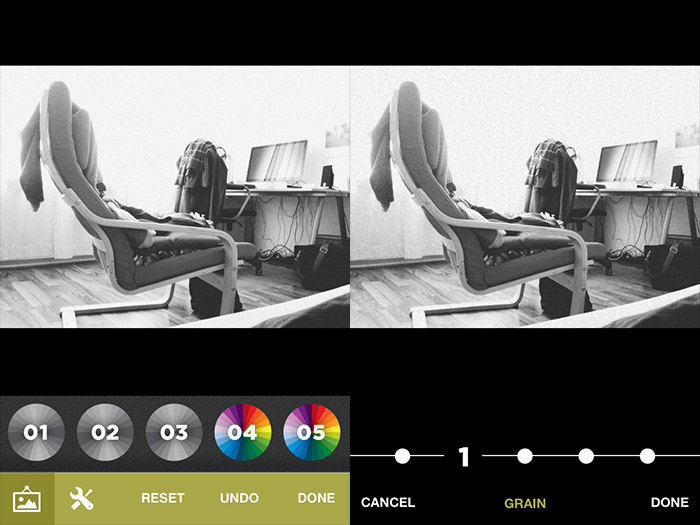
The are nine editing controls, from which you first only see five. You have to scroll horizontally to get to the other four. I simply didn’t recognise this at first. Same for the filters, but there I swiped intuitively. I don’t know why. The editing is very simple, you choose how much you want use a certain effect, tap ‚done‘ and choose another setting. You can apply every setting as often as you want. The effect stacks up. As far as I can see there is no way to reset a specific setting. Just the possibility to reset your whole editing process or do a global undo.
I am especially pleased with the black and white editing. And that’s something not one photo editing app I tried was really really good at. So here we go. And I love the ability to add grain. Overall the editing settings support the image style I like.
Sharing a photo
There are all kinds of sharing possibilitys as well as saving different sizes to your camera roll. You can even share to Instagram, which is pretty much useless, because it just opens the Instagram app with your chosen photo locked in the editing screen, letter boxed.
I really like VSCO CAM. This first version is very good, but I also hope they will ship some updates in the future to make the app even better. Go try it out yourself.
This is how I clench the iPhone in my hands when photographing on the streets. Despite a friend’s remark, I don’t think it’s unusual. I refer to it now as “clawing the iPhone†because that’s how my friend Victor described it when he pointed out the odd similarity to a bird gripping on to a twig or something. I use my thumb to press on the shutter button and it’s as easy as that.
I often hold my iPhone the same way when photographing in landscape mode. As Jorge I am sometimes scared to drop the phone, too. But most of my photos I take with Instagram in portrait mode anyway.
Am 10. Oktober 2010 habe ich mich als 62062. Nutzer bei Instagram registriert. Mein erstes Foto zeigte ganz unspektakulär ein etwas unaufgeräumtes Wohnzimmer mit einer Palme und Schrankwand. Ich erhielt dafür drei Likes, danach passierte so gut wie nichts. Und das blieb auch bei den folgenden Fotos so. Genau wie Twitter vor nunmehr über fünf Jahren war dieses Instagram nun da – und ich wusste nicht so recht etwas damit anzufangen. Auch Instagram erschließt sich erst, wenn man es selbst ausprobiert und von innen erlebt hat.
Bosch und Instagram. Eine mobile Liebesgeschichte mit tollen Fotos.
We’re finally ready to unveil the API for the new Basecamp. The documentation lives on Github and we encourage developers to help us improve it with pull requests.
Yeah, that’s pretty cool. Hope someone will finally build a great iPhone App for Basecamp.
Unfortunately, DSLRs are painfully outdated. With them you can’t tweet or email photos, you can’t crop or adjust them and you can’t organize your library. And to get your photos anywhere, you’ll need a cord or a compatible card reader. This is ridiculous given that it’s 2012. […]
The solution: remove everything from the back side of the camera and make it an iPhone dock:
The biggest problem of all these great, innovative solutions with iPhones is, that while using the them, the iPhone isn’t usable any more. You can not listen to music, write an email, have a phone call, check twitter or anything else. I often like the thoughts behind all these ideas and it looks cool at first, but in the end I can’t see me using most of them.