Use jsfiddle.net for problem solving

I can’t stress this enough, use jsfiddle.net.
Never heard of it? Ok, here we go: At jsfiddle.net you can easily try out some stuff with HTML, CSS and Javascript. There are four panels, one for each input language and one for the result. They even support SCSS and CoffeeScript. There is syntax highlighting, simple loading of jQuery or other libraries and so on. It is perfect to test something very fast and share it with others. And if you have an account you can save your fiddles for later.
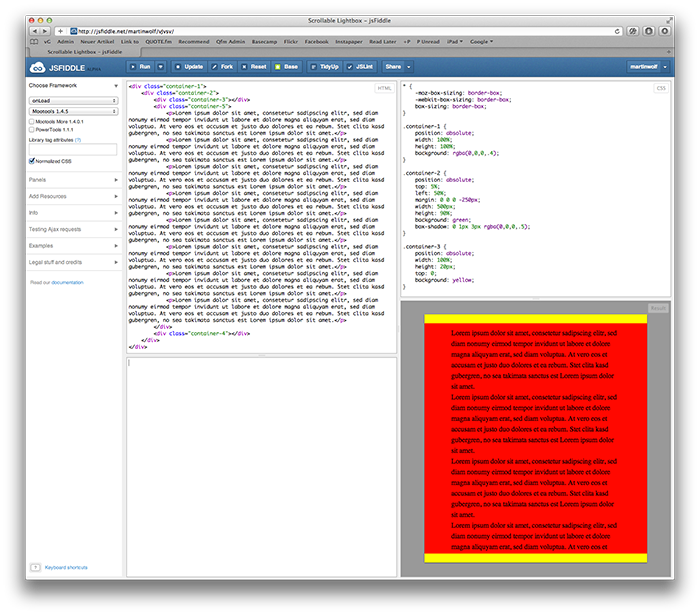
It is very simple, but also very very good. If I have a question I often put together some lines with jsfiddle and share it on twitter to get help. So everybody can edit the fiddle and save a new version to share it again.

It’s perfect for sharing but it’s also very good for private use. When I’m stuck on a problem while coding QUOTE.fm I’m often so caught up in the context of the whole site that I just need to start fresh and separate the problem. jsfiddle is perfect to tackle just a single issue. So I often throw together only the needed code to just work very focused on that exact problem. And usually I can work out a solution which I can use for solving the original problem.

Sure you can do this locally with your code editor, but jsfiddle is much faster and again, you can easily share it if you need to. I also like to save my solution so I can come back whenever I need to look at it again. Here is an example of a problem I had and where jsfiddle helped me to get a fresh look at it.

jsfiddle is just an alpha version and is constantly getting better. I’m sure I haven’t even discovered everything there is now – for example I just discovered keyboard shortcuts for saving, running the code, etc.

So next time you have a question, a problem or want to just try something very quick, use jsfiddle.
Hot in web standards!

Lea Verou:

Ever wanted to blur an HTML element? Greyscale its contents? Use Photoshop-style blending modes on it, like „Multiply“? There are two new proposals that do exactly this

Lea Verou started a regular series on .net magazine in which she reports about upcoming cool stuff regarding web development. I’m really excited about CSS filters and blending modes. They will make my life so much easier every time I need to style HTML elements exactly like Marcel did in Photoshop – which is the case almost every day.
There some more cool things on the way, so make sure to read the whole piece to stay up to date.

Workplace experiments: A month to yourself

Jason Fried:

This June will be a full month of free time to think, explore, mock up, prototype, whatever. People can go solo or put together a team – it’s entirely up to them. This is a month to unwind and create without the external pressures of other ongoing projects or expectations. We’re effectively taking a month off from non-essential scheduled/assigned work to see what we can do with no schedule/assignments whatsoever.

That’s so cool and I think it’ll work out great for them.
On the one hand more companies should do things like that, but on the other hand only a few are able to put down their day to day work for one month and still be reasonable profitable, I think.

The indentation of lines

Today I have a question for you guys which bothers me every time I set up a new code editor. Recently it was Coda 2. As I always do when I get a new app I looked at all preferences, just to get an overview of the possibilities.

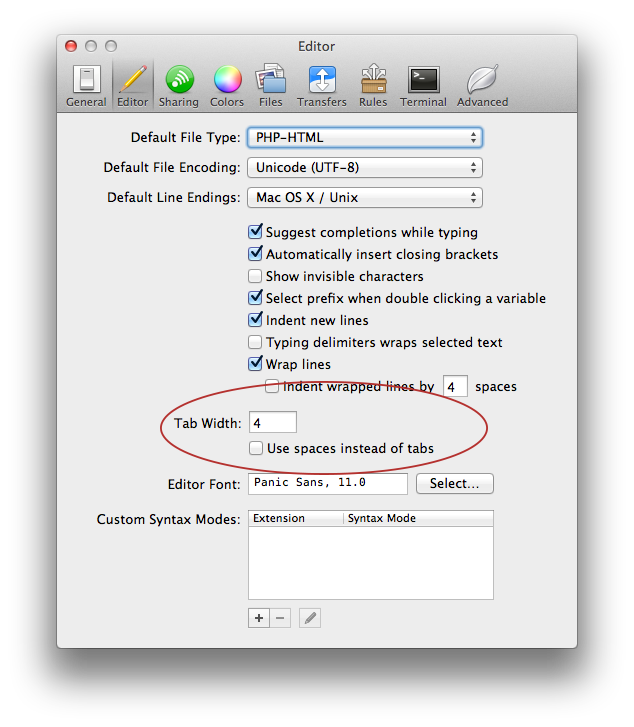
I stopped at ‚Tab Width: 4 – Use spaces instead of tabs‘, thought about it and didn’t check it. Until today I always used tabs to indent lines. I thought it was clearly the better way because it’s just one key stroke to delete an indentation. But since there is that option I wonder what the advantage is and how you handle indentation of lines?

Update: As it turns out in the comments, using spaces is the better way. A good editor (like Coda 2 or Espresso 2) will delete tab generated spaces with one key stroke. Going with spaces you also make your code future proof, backwards compatible and perfectly readable on every OS. Now I think this should be standard in every code editor. Do you hear me, Panic?

There is no such thing as ‚designing‘ in the browser

Robert Rawlins:

„Designing in the browser“ is a myth – there is no such thing. Nobody has ever done it, and nobody ever will.

As I’ve said.

Facebook stops supporting webkit browsers

Facebook:

You’re using a web browser we don’t support.
Try one of these options to have a better experience on Facebook.

Facebook stops supporting webkit browsers. That’s a bold move, which I don’t understand. Yeah, Chrome is made by Google and they are not best friends with Facebook, but Chrome recently became the ‚most used Web browser‚. Besides, the webkit engine is great in any regards.
So does anyone know something about that move by facebook?

Update: Okay, I might have gotten that wrong. Facebook isn’t saying that they stopped supporting webkit browsers – but they definitely don’t recommend using them either, which is still awkward.

Scalable and Modular Architecture for CSS

Jonathan Snook:

I’ve been analyzing my process and the process of those around me and figuring out how best to structure code for projects on a larger scale. What Ive found is a process that works equally well for sites small and large.Learn how to structure your CSS to allow for flexibility and maintainability as your project and your team grows.

Just bought SMACSS, a book by Jonathan Snook about all things CSS. I know how to write CSS, but working on a big project like QUOTE.fm made me realize that writing CSS and writing CSS are not always the same. Crafting a robust, large site is much harder than throwing together a simple WordPress theme. Yesterday was the first time I applied a class to an element and forgot, that I already used it for a total different part of the site.
So while I have already learned a lot building the Front-End of QUOTE.fm, there is still so much to learn. I hope SMACSS will help me refine my CSS skills for large scale sites.

My CSS coding style, part I – CSS properties order

Some weeks ago Harry Roberts wrote a piece about his HTML & CSS coding style. I found it very interesting to see how an other Front-End Developer works and so today I want to talk a little bit about my own ’style‘. I decided to split it into more than one post. So here is part I about CSS properties.

Over the years I have developed a set of rules for writing my CSS. For example I order my properties in a specific way. This makes it a lot easier to find specific ones if I need to change them later and I also have a good procedure while writing the code. For example I always define the display first, then I do the positioning and so on. Some of my rules make sense, some don’t, but I’m used to writing it that way and it helps me to work faster and better.
The overall thinking behind my order is that I first define general things like what the element is, where it sits, how big it is. Then I define the things in the element, beginning with the typhography. In the next step I work myself to the outside with things like border or box-shadow. And at the end I place some general stuff like overflow and z-index.

Today I want to show you my order. I might have forgotten some very rare properties, but I think I covered the most used ones. In reality you’ll probably almost never have to write all these properties at once, but if you had to (I had to once), it could look like this.
Maybe it’s something you want to adopt for your own code or you can just look how I work. Either way, here it goes:

.myclass {
    content: '';
    -webkit-box-sizing: border-box;
       -moz-box-sizing: border-box;
            box-sizing: border-box;
    display: block;
    position: static;
    float: none;
    top: auto;
    right: auto;
    bottom: auto;
    left: auto;
    margin: 0;
    padding: 0;
    max-width: auto;
    max-height: auto;
    min-width: 0;
    min-height: 0;
    width: auto;
    height: auto;
    color: #000;
    font-family: 'Droid Sans', Arial, sans-serif;
    font-size: 12px;
    font-weight: normal;
    line-height: 15px;
    text-align: left;
    text-indent: 0;
    text-decoration: none;
    text-transform: none;
    text-overflow: clip;
    text-shadow: none;
    letter-spacing: normal;
    vertical-align: baseline;
    white-space: normal;
    word-spacing: normal;
    word-wrap: normal;
    direction: ltr;
    -webkit-text-size-adjust: none;
    -webkit-column-count: 1;
       -moz-column-count: 1;
    ccolumn-count: 1;
    -webkit-column-gap: 0;
       -moz-column-gap: 0;
            column-gap: 0;
    background: transparent;
    -webkit-background-size: 100% 100%;
            background-size: 100% 100%;
    border: 0;
    -webkit-border-radius: 0;
       -moz-border-radius: 0;
        -ms-border-radius: 0;
         -o-border-radius: 0;
            border-radius: 0;
    -webkit-box-shadow: none;
       -moz-box-shadow: none;
        -ms-box-shadow: none;
         -o-box-shadow: none;
            box-shadow: none;
    -webkit-opacity: 1;
       -moz-opacity: 1;
        -ms-opacity: 1;
         -o-opacity: 1;
            opacity: 1;
    -webkit-outline: 0;
       -moz-outline: 0;
        -ms-outline: 0;
         -o-outline: 0;
            outline: 0;
    -webkit-transform: none;
       -moz-transform: none;
        -ms-transform: none;
         -o-transform: none;
            transform: none;
    -webkit-transition: 0;
       -moz-transition: 0;
        -ms-transition: 0;
         -o-transition: 0;
            transition: 0;
    visibility: visible;
    clear: none;
    clip: auto;
    cursor: auto;
    overflow: none;
    z-index: auto;
}

I’m very interested if you might have some similar rule or if you just write your CSS as it pops into your head. Write a comment or publish a blog post about your rules and let me know it. Cheers!

The First Smashing Conference Is Coming

Vitaly Friedman:

In a nutshell: The Smashing Conference is a friendly, valuable and inspiring community event that will help designers and developers become better in their work, be it front- or back-end development, UX design, content strategy or running a business.

From September 17th to 19th 2012 the first Smashing Conference will take place in Freiburg, Germany. I’m really tempted to go there. Price is €249 for the first 70 tickets and then €349 for the remaining 280. That’s a lot of money, but is anybody going?

Coda 2 LESS Syntax Highlighting

Paul Welsh:

Sytax Highlighting for LESS in Coda 2 (based on the CSS.mode supplied with Coda 2)

For Coda I had Syntax Highlighting for LESS because it didn’t recognize LESS as CSS and there are also some differences in the syntax itself. So here it is for Coda 2. Thanks Paul!

But I think in the future I’ll need the same for SASS.